Midterms
Midterm Quizzes
These are the quizzes taken during the midterm period.
Quiz # 1
Score: 27/30
Quiz # 1
💡 Quiz Summary
The quiz covers the important concepts in Java, starting from its history and introduction to how a Java program is structured. It helps reinforce understanding of variables, methods, and how different parts of a program work together. It also reviews operators, which are used for calculations and decision-making in code, and control structures that manage the flow of a program through conditions and loops. It connects these topics in a way that helps deepen understanding of how Java is actually used in programming.
Midterm Seatworks
These are the seatworks completed during the midterm period.
Seatwork # 1
Score: 30/30
Seatwork # 1
💡 Seatwork Summary
This seatwork focused on unary operators in Java and how they affect the value of variables in a program. The task was to analyze a program step by step and determining the correct output for each line. This helped in understanding how increment and decrement operators work, especially when they are used in different forms like pre-increment and post-increment. This improved the ability of logically tracing and carefully following how values change throughout program execution.
Seatwork # 2 - Tuition Fee Payment
Score: 30/30
Seatwork # 2 - Tuition Fee Payment
💡 Seatwork Summary
The hands-on paper seatwork focused on analyzing a tuition fee payment problem using a switch statement. It required carefully understanding the given scenario and determining how different cases should be handled in the program.
Midterm Assignments
These are the assignments completed during the midterm period.
Assignment # 1 - About Me
Download PDF
Grade: 30/30
Assignment # 1 - About Me

💡 Assignment Summary
This assignment serves as a creative introduction, showcasing personal background, aspirations, and the journey toward learning Java programming.
Assignment # 2 - Introduction to Java
Download PDF
Grade: 30/30
Assignment # 2 - Introduction to Java
Java is a high-level, general purpose, memory-safe, object-oriented programming language. It allows developers to write code that can run on any device with a JVM, which makes it highly portable. It is widely used for building applications, such as mobile apps, web applications, and software applications.
The concept of "Write Once, Run Anywhere" (WORA), which is made possible by the JVM that interprets compiled code (bytecode) into machine-specific instructions, regardless of the computer's operating system and hardware.
- Package - group of classes and interfaces that organizes the code
- Class - defines variables and methods
- Method - a block of code that performs a specific task
- Variable - a name memory location used to store and manipulate data
- Statement - an instruction that performs an action
- Java Development Kit (JDK) - it contains all the tools that are required to compile, debug, and run a program, using the Java platform. It is the foundational component that enables Java application and Java applet development.
- Java Runtime Environment (JRE) - a set of software tools responsible for execution of the Java program or application
- Java Virtual Machine (JVM) - it loads, verifies, and runs Java bytecode and is necessary in both JDK and JRE. It can also run programs that are written in other programming languages that have been converted to Java bytecode.
Interpreted languages execute code first without compiling while compiled languages require the code to be translated into machine code before executing. Java is considered a hybrid language because it is both compiled and interpreted. The source code is compiled into bytecode and then interpreted by the JVM.
References
- Wikipedia
- Geeks for Geeks
- IBM
Midterm Activities
These are the activities created and completed during the midterm period.
Midterm Activity #1 - Variables
Download PDF
Grade: 27/30
Midterm Activity #1 - Variables
- Carefully analyze the given Java program.
- Trace the references and memory changes step-by-step.
- Complete all required tables and questions.
- Show your logical reasoning where necessary.
class Student {
      String name;
      int grade;

      Student(String n, int g) {
            name = n;
            grade = g;
       }
}

public class TestStudent {
       public static void main (String[] args) {
                Student s1 = new Student ("John", 85);
                Student s2 = new Student ("Maria", 90);
                Student s3 = s2;

                s1.grade = 95;
                s3.name = "Ana";

                System.out.println(s1.name + " " + s1.grade);
                System.out.println(s2.name + " " + s2.grade);
                System.out.println(s3.name + " " + s3.grade);
        }
}
Part A - Variable Identification Table
| Variable Name | Data Type | Variable Type | Stored In |
|---|---|---|---|
| name | String | Instance | Heap |
| grade | int | Instance | Heap |
| s1 | Student | Local | Stack |
| s2 | Student | Local | Stack |
| s3 | Student | Local | Stack |
| n | String | Local | Stack |
| g | int | Local | Stack |
Part B - Explanation
| Statement | What Happens? | Memory Impact |
|---|---|---|
Student s1 = new Student("John", 85); |
Creates a new student and stores it at s1, "John" 85 | Created in Heap -> s1 Stack |
Student s2 = new Student("Maria", 90); |
Creates a new student and stores it at s2, "Maria" 90 | Created in Heap -> s2 Stack |
Student s3 = s2; |
s3 is assigned the same as s2, Maria 90 -> s3 | s2 & s3 -> same in Heap |
s1.grade = 95; |
Updates the grade of s1, John 95 | s1 grade becomes 95 |
s3.name = "Ana"; |
Updates the name of s3, Ana 90 | s2 name becomes "Ana" which also becomes s3 |
Part C - Output
It will print:
John 95
Ana 90
Ana 90
💡 Key Explanation
This shows how Java stores objects in memory using the stack and heap. Variables s1, s2, and s3 are stored in the stack and hold references to objects in the heap. When s3 = s2, both point to the same object, changing one also changes the other. Unlike s1 which is separate, so its changes does not affect the others.
Midterm Activity #2 - Operators
Download PDF
Grade: 30/30
Midterm Activity #2 - Operators
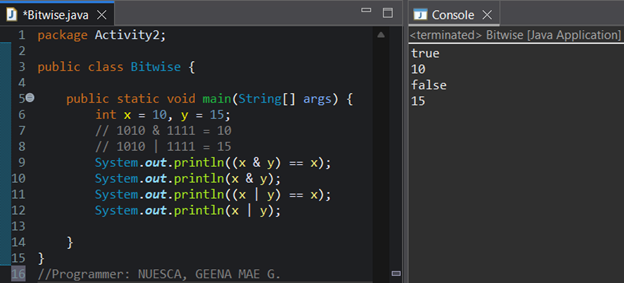
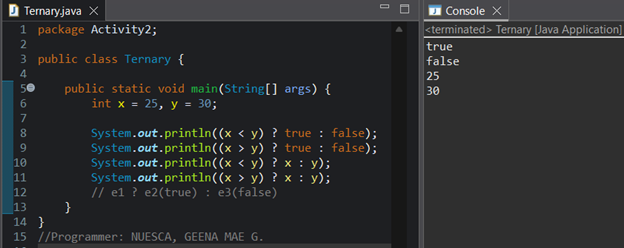
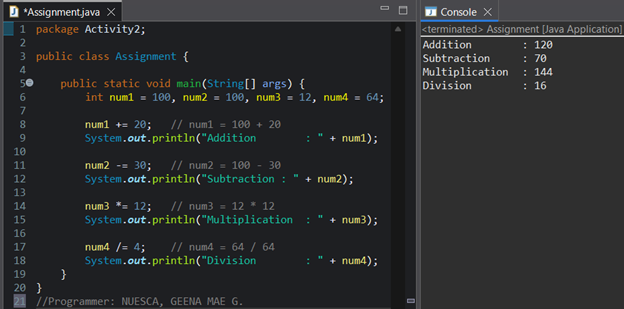
- Create a Java program based on the questions.
- Follow the exact required output shown in the question.
- You must use the specific operator required in each number.
- Show proper use of variables and correct operator usage.
- Follow proper Java syntax, indentation, and naming conventions.
Part I
Part II
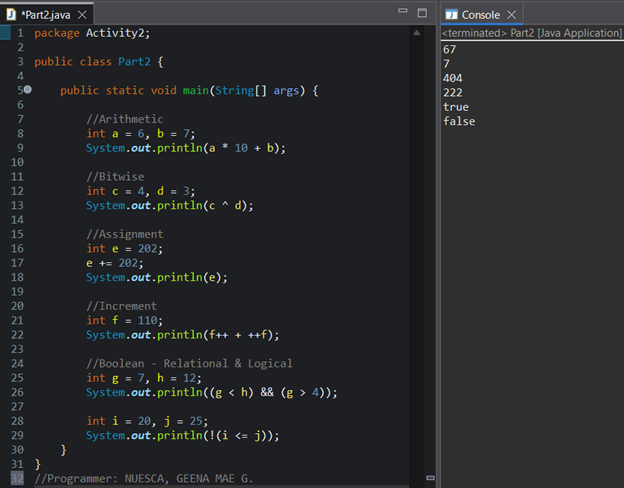
- Use at least five (5) different operators from the following categories:
- Arithmetic operators (+, -, *, /, %)
- Relational operators (>, <, >=, <=, ==, !=)
- Logical operators (&&, ||, !)
- Unary operators (++, --)
- Assignment operators (+=, -=, *=, /=)
- Bitwise operators (&, |, ^, <<, >>)
- The program must produce exactly six (6) outputs only.
- At least one output must include a tricky
increment or decrement case, such as:
a++ + ++a--b + b++- or any similar expression that modifies the variable within the same statement.
- Do NOT reuse:
- Any variable values
- Any variable names
- Any logic patterns from Part I.
- The output must contain:
- At least two (2) boolean results
- At least four (4) numeric results
💡 Key Explanation
The activity helps understand how different Java operators work and how they affect variables and program output. This strengthens the ability to trace expressions, predict outputs, and correctly apply operators in Java programs.
Midterm Activity #3 - ATM with Transfer Feature
Download PDF
Grade: 30/30
Midterm Activity #3 - ATM with Transfer Feature
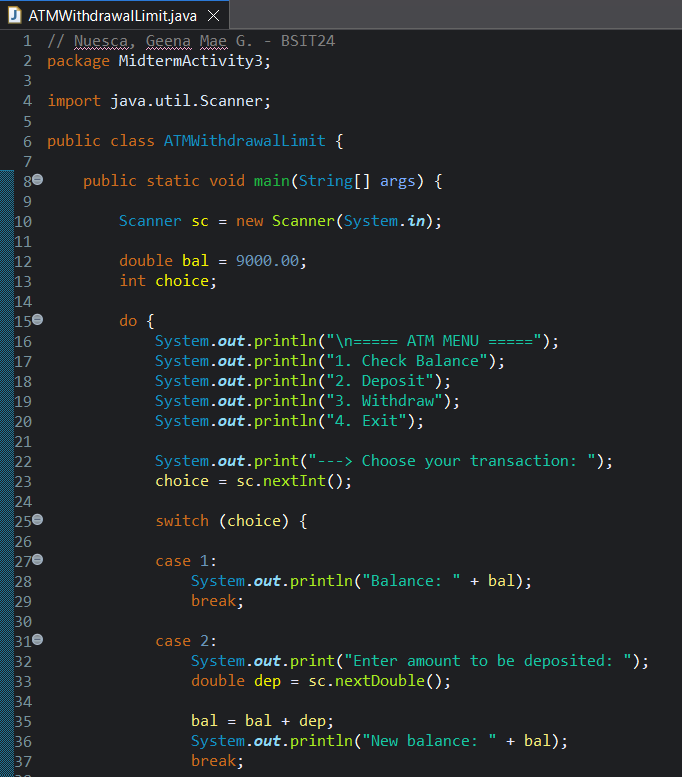
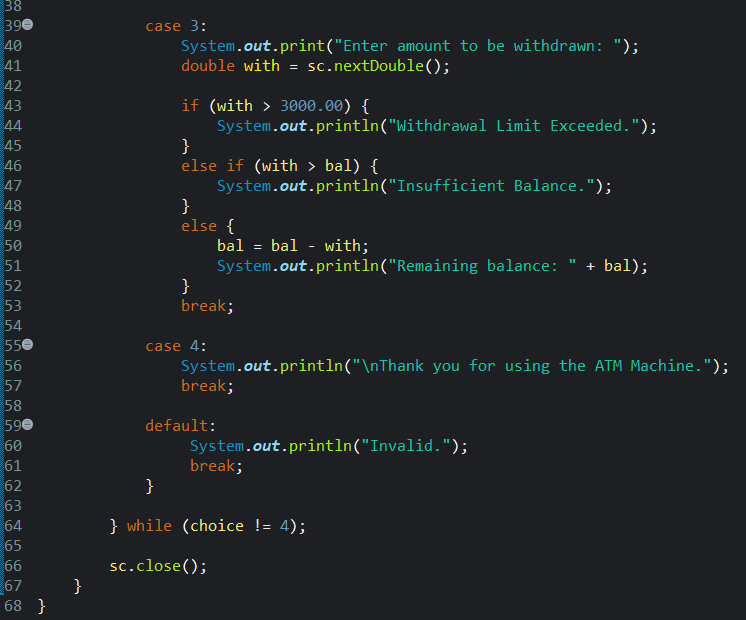
- Create a Java program named
ATMWithdrawalLimit. - Assume the initial balance is 9,000 pesos.
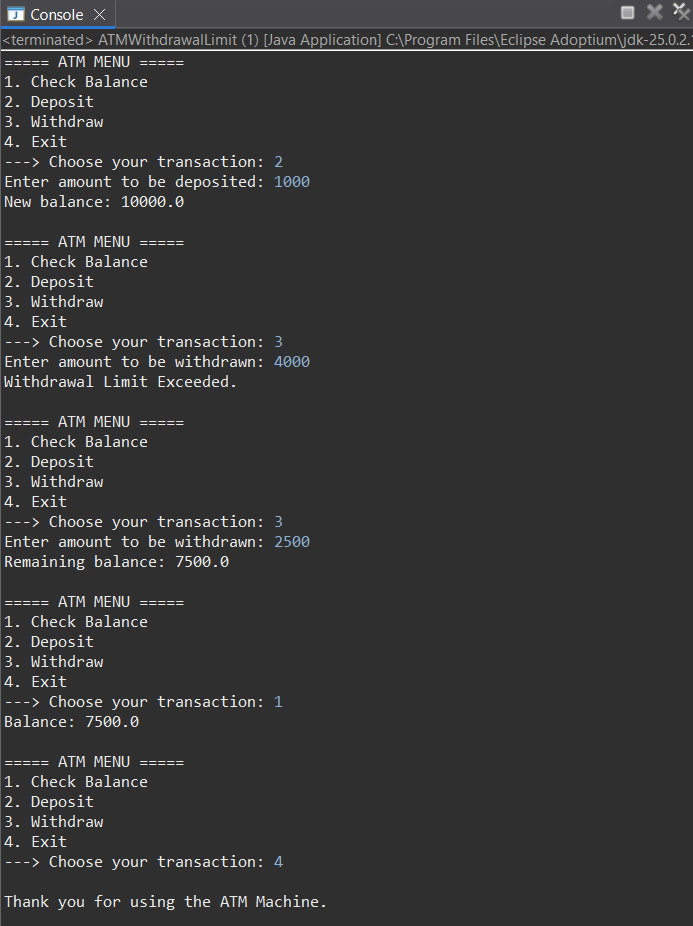
- 1. Check Balance
- 2. Deposit
- 3. Withdraw
- 4. Exit
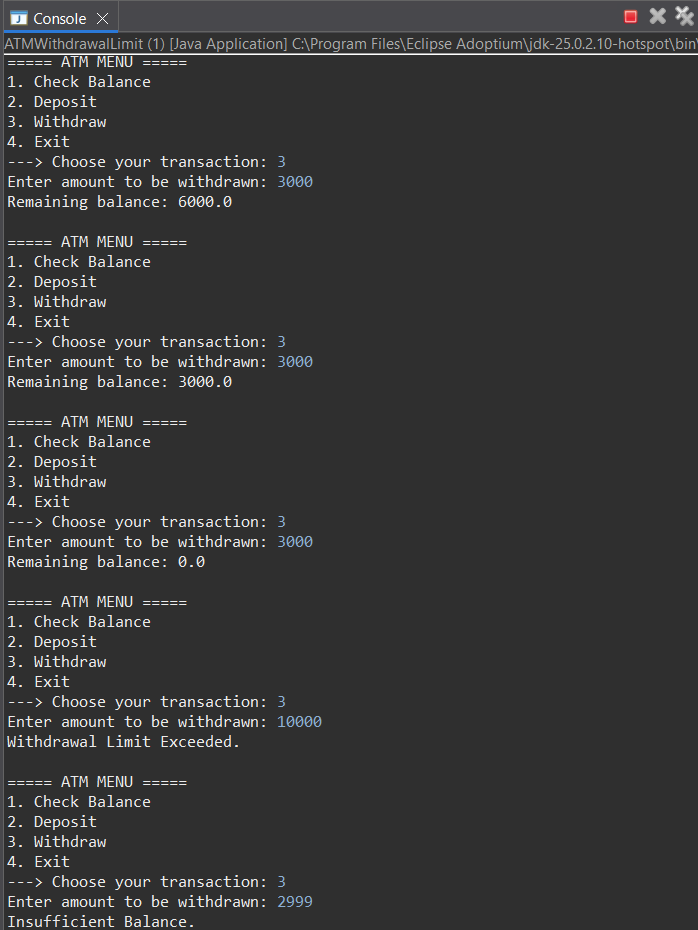
- Maximum withdrawal per transaction: 3,000 pesos
- If exceeded, display:
Withdrawal Limit Exceeded
if-elsestatementsswitchstatementdo-whileloop
💡 Key Explanation
This activity teaches how to build a simple interactive Java program using control structures. The ATM system simulates real-life banking operations like checking balance, depositing, and withdrawing money. It helps you practice decision-making, looping, and structuring programs logically while enforcing rules like withdrawal limits.
Midterm Activity #4 - Student Payment System with Validation Counter
Download PDF
Grade: 30/30
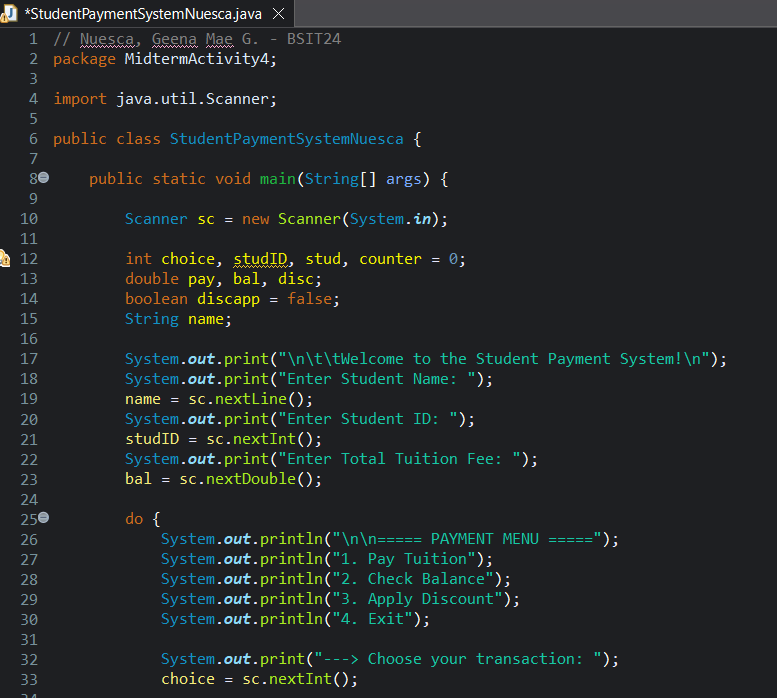
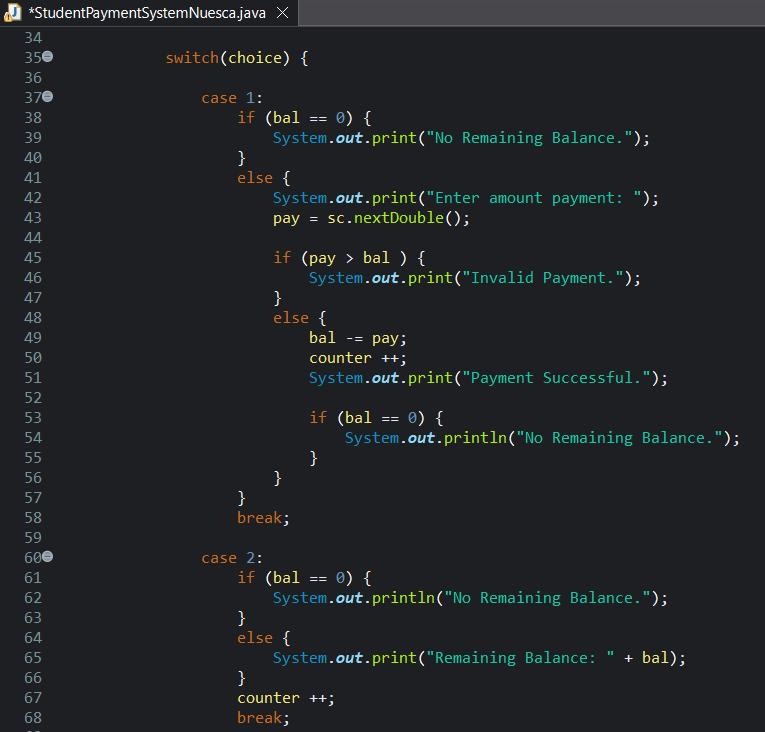
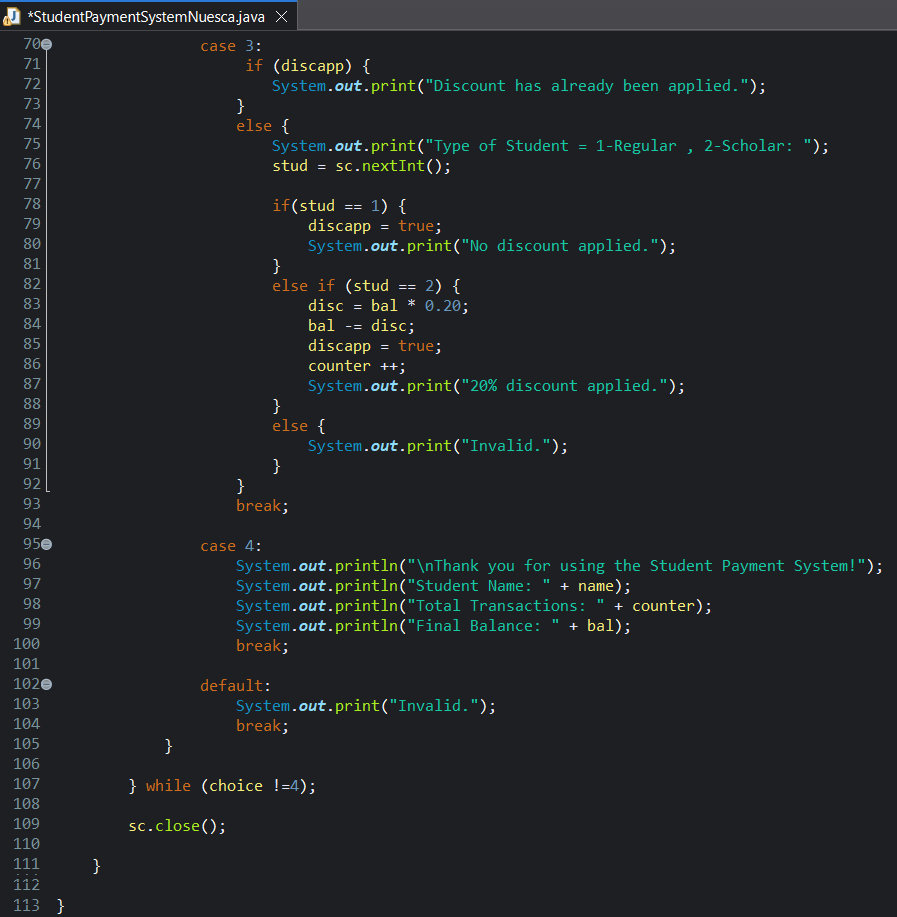
Midterm Activity #4 - Student Payment System with Validation Counter
- Create a Java program named:
StudentPaymentSystemLastName(Example: StudentPaymentSystemBedis) - Ask the user to input:
- Student Name
- Student ID
- Total Tuition Fee
- Display the menu:
- 1. Pay Tuition
- 2. Check Balance
- 3. Apply Discount
- 4. Exit
General Rules
- Use
switchstatement to process menu options - Use
do-whileloop to repeat the program until Exit - Use nested
ifstatements for validation - Use a counter variable to track number of transactions
Payment Rules
- Pay Tuition
- Ask for payment amount
- Validate:
- If payment > remaining balance → display:
Invalid Payment - Else → deduct from balance
- If payment > remaining balance → display:
- Increment transaction counter
- Check Balance
- Display remaining balance
- Increment transaction counter
- Apply Discount
- Ask user if they are:
- Regular Student
- Scholar
- Conditions:
- If Scholar → 20% discount
- If Regular → no discount
- Discount applies only once
- Ask user if they are:
- Exit
- Display:
- Student Name
- Total Transactions
- Final Balance
- End program
- Display:
Additional Conditions
- Prevent negative balance
- Prevent multiple discount applications
- Show message:
No remaining balanceif fully paid
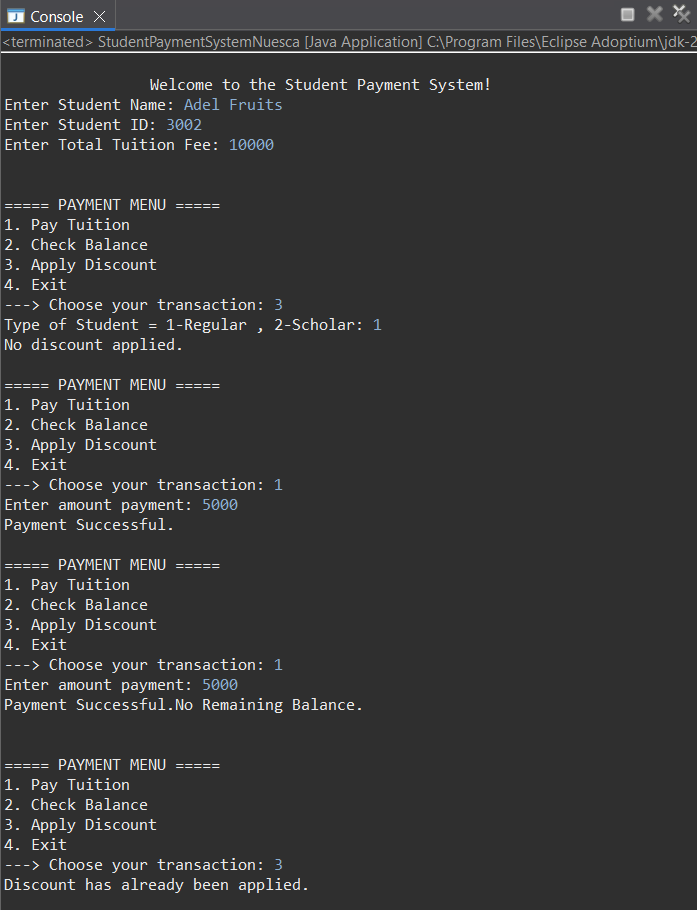
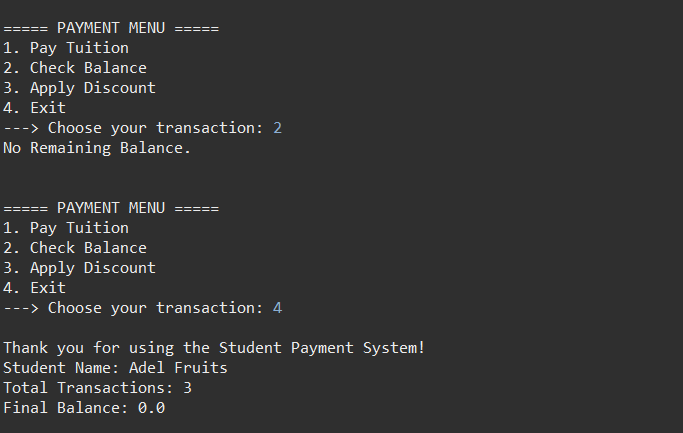
Output (1)
Output (2)
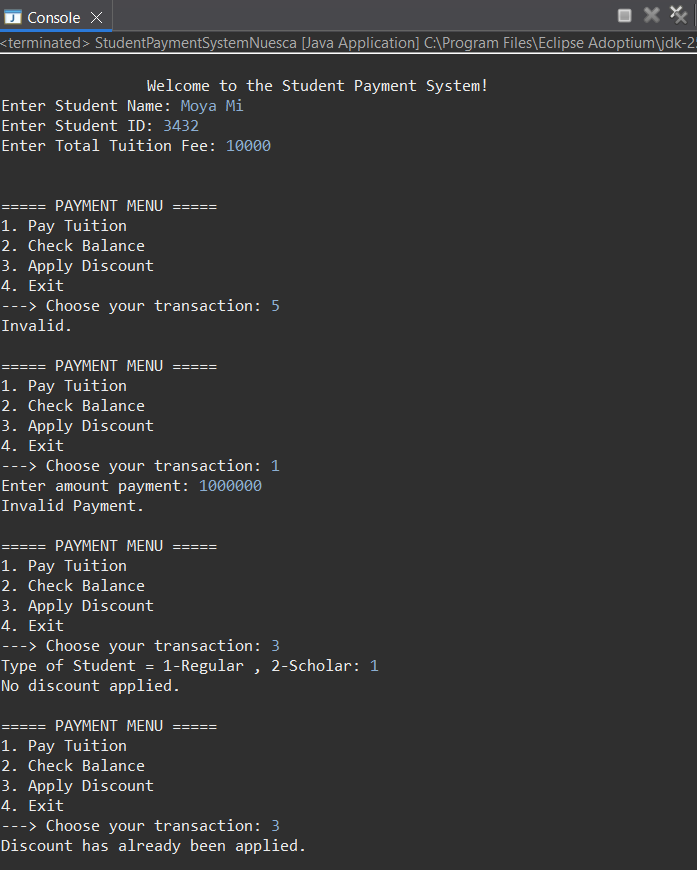
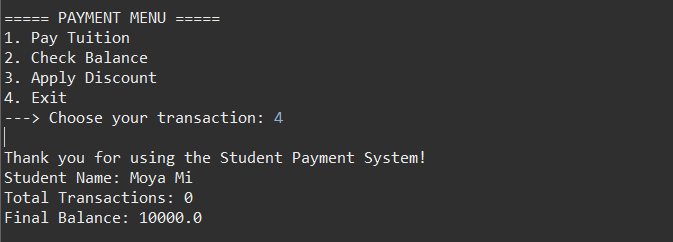
Output (3)
💡 Key Explanation
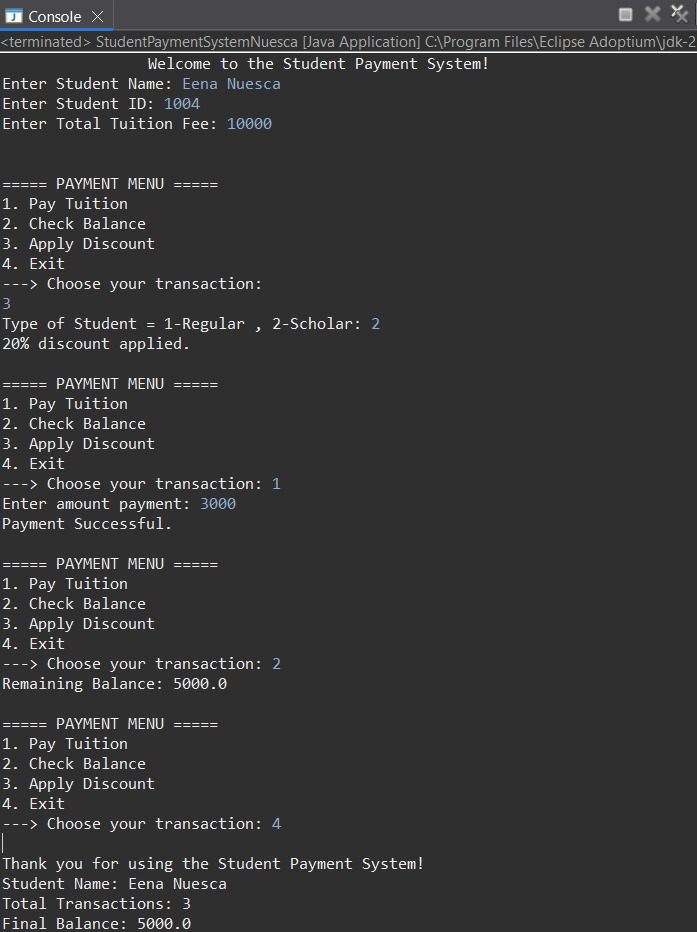
This activity simulates a student payment system where a user enters their details and manages their tuition balance. The user can make payments, check how much is left, and apply a discount if eligible. The program ensures payments are valid by preventing overpayment and negative balances, and it only allows the discount to be applied once. It also keeps track of how many transactions are made. At the end, it shows the student’s name, total transactions, and final remaining balance.
Midterm Activity #5 - Personal Expense Tracker
Download PDF
Grade: 30/30
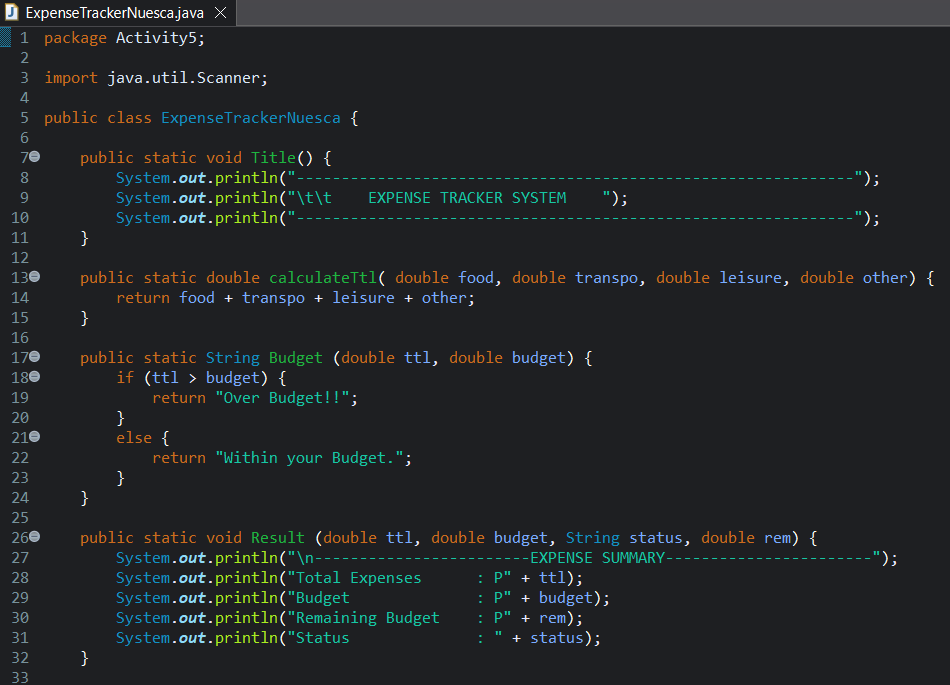
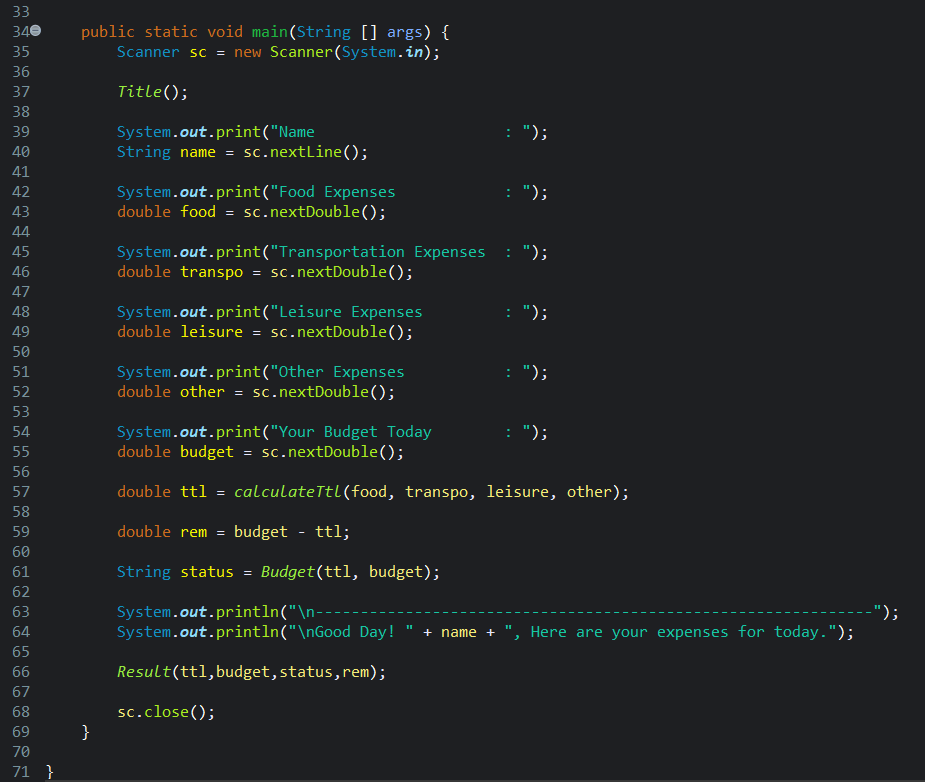
Midterm Activity #5 - Personal Expense Tracker
- Create a Java program named
ExpenseTrackerLastName. - Implement the following methods:
- A
voidmethod that displays the program title. - A non-void method that calculates the total expenses using three values:
- food
- transportation
- other expenses
- A non-void method that checks if the total expense exceeds a budget and returns a message.
- A
voidmethod that displays the total expense and the budget status.
- A
- In the
mainmethod:- Call all the methods you created.
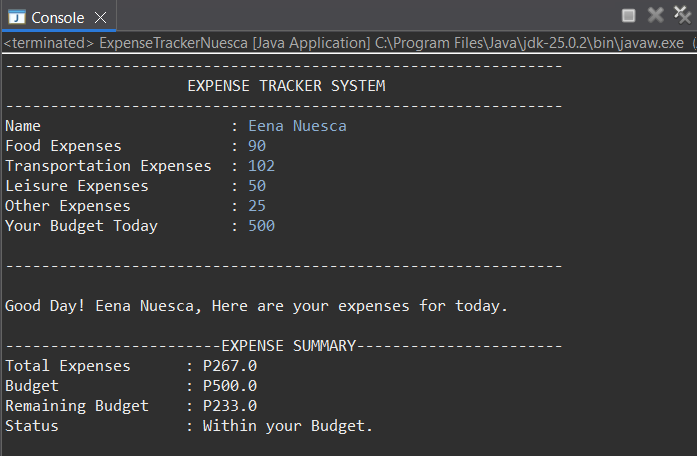
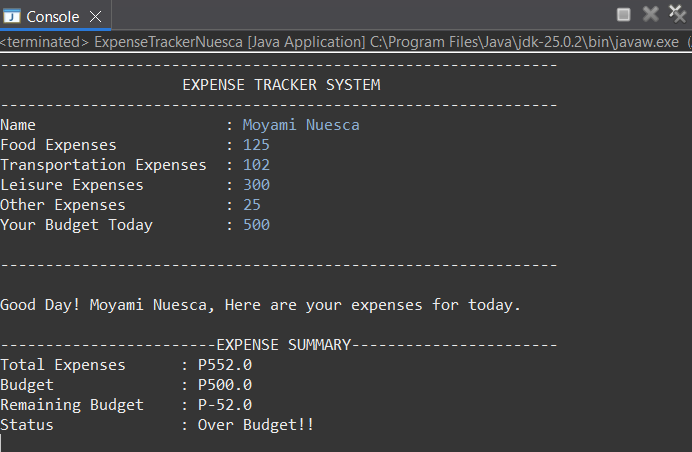
- Display the final output clearly.
- Use appropriate method names, parameters, and return types.
- Add at least TWO enhancements:
- Accept user input
- Add another expense category
- Compute remaining budget
- Display a personalized message
💡 Key Explanation
This activity simulates a simple expense tracker using methods in Java. The program separates tasks like displaying the title, computing total expenses, and checking if the budget is exceeded. It takes user input for different expenses, calculates the total, and compares it to the budget to determine the status and finally, show the summary of expenses.
Midterm Exam
This is the examination completed for the midterm period.
💡 Exam Summary
The midterm exam covered all the key topics discussed throughout the lessons and tested my ability to analyze and trace code. It also helped strengthen my understanding of how all the concepts are connected and how they are applied together.